Display options and "scribbles" on the screen
For most of the presentations, all you need to do to see his show is beaten [F5] or go to the menu bar and click [Slides - ViewShow]. Its program is run in full screen and can navigate slide to slide with the arrow keys.
However, there are a couple of fun options to show you may want to experiment. If you go to the File menu and click [Slides - Create Show] you will find a lot of options that can show changes. Most of these options can be ignored, and to cope with the kind kiosk presentations (unmanned presentations with a pre-recorded voice tracks).
One option that may be of interest is the "crayon." You can choose a color pencil, and during his presentation, you can call on the screen with the mouse
However, there are a couple of fun options to show you may want to experiment. If you go to the File menu and click [Slides - Create Show] you will find a lot of options that can show changes. Most of these options can be ignored, and to cope with the kind kiosk presentations (unmanned presentations with a pre-recorded voice tracks).
One option that may be of interest is the "crayon." You can choose a color pencil, and during his presentation, you can call on the screen with the mouse

Let’s try it. View your show full-screen by clicking [F5]

Pen To activate the feature, click [Control + P]. Then you can draw directly on the slide. Will have very good hand-eye control to point the mouse, however 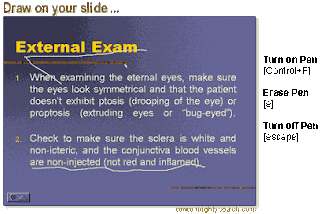
You can delete your drawing write the letter [E]. To escape the pen mode, press [Esc] button. Be sure to hit [escape] only once, because if you hit twice, he was dumped out of his show and again in edit mode slide. This characteristic of the pen is a fun trick, but do not use it often, because my laser pointer is more useful.
Categories:
24. Display option and "scribbles" on the screen


